
MDfit
Solutions
  • Contact Centers
  • Patient Self-Service
  • Voice AI Automation
  • Marketing with AdFit
  • Directory Management
Patient AccessClinical StrategyFinancial ImpactMarketingResourcesAbout
For Patient Access Leaders, Contact Center Managers, and Operations Teams

Enterprise Patient Access Across Scheduling Channels

Solutions that transform how patients connect with care across your organization

Patient access coordinator using scheduling technology to connect patients with care

Patient Journey

Follow the Patient Journey to Scheduled Care

Different healthcare organizations face unique scheduling challenges. Select your organization type to see the problems most relevant to you and how MDfit addresses them.

Growth and utilization are directly tied to scheduling conversion, referral activation, and minimizing wasted provider time. Operationally lean teams feel call burden immediately.

Patient Journey Map

Click any problem to jump to its details below

1

Discovery & Referral

2

Scheduling

3

Phone & Support

4

Confirmation & Visit

5

Retention & Capacity

1

Discovery & Referral

2

Scheduling

3

Phone & Support

4

Confirmation & Visit

5

Retention & Capacity

Match the Access Problem to the Right Solution

Each problem below names the MDfit solution that addresses it and how the fix changes the patient's path to care.

Problem 1Patient Self-Service

New Patient Acquisition Drop-Off

Marketing leads fail to convert to appointments

After investing in marketing, practices lose potential patients who click 'Book Now' but can't quickly find the right physician with availability or complete the booking process. They leave and schedule with competitors instead.

Impact on Your Organization

  • Poor ROI on marketing spend
  • Lost new patient growth
  • Competitors capturing your leads
  • Inability to track conversion issues

The MDfit Solution

MDfit's conversion-optimized self-scheduling removes friction from the booking flow, with fast availability display and minimal steps—turning marketing clicks into confirmed appointments.
Problem 2Patient Self-Service

Referral-to-Appointment Leakage

Referred patients never get scheduled

Specialty practices depend on referrals, but many referred patients never schedule. Process friction, inability to reach patients, and confusion about next steps cause significant leakage.

Impact on Your Organization

  • Lost downstream revenue
  • Referring providers stop sending patients
  • Gaps in care continuity
  • Wasted referral acquisition efforts

The MDfit Solution

MDfit's referral activation workflows automatically reach referred patients with direct scheduling links, tracking conversion and following up until appointments are booked.

Problem 3Patient Self-Service

Abandoned Online Scheduling

Complex flows drive patients to call or leave

Patients attempt online booking but abandon due to confusing visit types, too many steps, or portal login requirements. They either call—increasing staff burden—or give up entirely.

Impact on Your Organization

  • Increased call volume for simple bookings
  • Lost patients who don't call back
  • Wasted technology investment
  • Staff handling avoidable calls

The MDfit Solution

MDfit's patient self-service is designed for simplicity—intuitive interfaces, smart defaults, and guided flows that make online scheduling faster and easier than calling.

Problem 4Advisor

Wrong Provider/Visit Type for Specialty

Specialty-specific constraints cause mismatches

Specialty practices have complex rules about which providers see which conditions, new patient requirements, and visit type prerequisites. Without encoded logic, bookings frequently need correction.

Impact on Your Organization

  • Rescheduled appointments hurt utilization
  • Clinician frustration with wrong bookings
  • Staff time spent fixing errors
  • Patient confusion about their care

The MDfit Solution

MDfit's rules engine captures your specialty-specific constraints, ensuring patients are matched to the right provider and visit type—whether booked online or by staff.

Problem 5Patient Self-Service

Patient Can't Determine Correct Appointment Type

Consult vs follow-up, in-person vs telehealth confusion

Patients don't know if they need a consult vs follow-up, in-person vs telehealth, procedure vs evaluation. Without guidance, they book the wrong type and those appointments need staff intervention for correction.

Impact on Your Organization

  • High error rates in self-scheduling
  • Staff cleanup work after bookings
  • Clinic day disruption
  • Longer wait times due to rebooking

The MDfit Solution

MDfit's guided booking flows ask simple questions to determine the right appointment type automatically, presenting only valid options based on patient responses.

Problem 6Advisor

Late Eligibility Surprises Cancel Appointments

Ineligible patients discovered days before their visit

Traditional eligibility checks often run just days before an appointment. By then, the slot has been held for weeks. When a patient turns out to be ineligible, the appointment is canceled late—leaving a slot that's nearly impossible to backfill on short notice.

Impact on Your Organization

  • Wasted slots from late cancellations
  • Revenue loss on unfilled appointments
  • Staff time spent rebooking and notifying
  • Disrupted provider schedules

The MDfit Solution

MDfit's optional eligibility check integration verifies patient coverage during the scheduling process—before the appointment is confirmed. This catches ineligible patients upfront, protecting your slots from late cancellations and giving your team time to resolve coverage issues proactively.

Problem 7Patient Self-Service

Cancellations Hurt Provider Utilization

Empty slots directly impact revenue

For practices where provider time equals revenue, unfilled cancellations are painful. Manual waitlist management can't keep up, and high-value slots go empty.

Impact on Your Organization

  • Direct revenue loss per empty slot
  • Provider utilization below targets
  • Longer wait times despite availability
  • Staff overwhelmed managing waitlists

The MDfit Solution

MDfit's automated waitlist instantly fills cancellations via SMS text message, prioritizing by revenue impact and patient preferences—protecting provider utilization without staff intervention. Timely automated reminders keep last minute cancellations to a minimum.

Problem 8Patient Self-Service

Inconsistent Reminders Drive No-Shows

Poorly timed or missing reminders cause missed visits

Reminders are missing, poorly timed, or not tailored by appointment type. Patients forget appointments or can't easily reschedule when conflicts arise.

Impact on Your Organization

  • High no-show rates
  • Wasted provider time
  • Unstable daily operations
  • Lost revenue from empty slots

The MDfit Solution

MDfit's intelligent reminder system sends tailored notifications at optimal times, with easy two-way confirmation and rescheduling options that dramatically reduce no-shows.

Problem 9AI Automation

Small Team Phone Burden

Limited staff can't handle call volume

Private practices operate with lean scheduling and front-desk teams. When call volume spikes, patients can experience long holds or unanswered calls—and there's no capacity or time to add temporary staff.

Impact on Your Organization

  • Patients abandoning calls
  • Staff stress and burnout
  • Missed scheduling opportunities
  • Poor patient experience

The MDfit Solution

MDfit's Voice AI—featuring natural, conversational speech with minimal latency rather than robotic, scripted responses—instantly scales to handle unlimited concurrent requests, absorbing peak demand while your team focuses on patients in the office.

Problem 10Patient Self-Service

Phone Tag with Patients

Multiple callbacks delay appointment booking

Appointment requests require multiple back-and-forth calls and voicemails. Staff waste time on repeated call attempts while patients wait for care.

Impact on Your Organization

  • High labor cost per scheduled visit
  • Delayed care for patients
  • Reduced conversion from intent to appointment
  • Staff frustration with repetitive tasks

The MDfit Solution

MDfit's asynchronous scheduling via text and self-service portals lets patients complete booking on their own time, eliminating the phone tag cycle entirely.

Problem 11Patient Self-Service

Patients Due for Care Aren't Reactivated

Follow-ups and preventive visits slip through the cracks

Patients lapse on follow-ups, annual visits, and routine care touchpoints. Without proactive outreach, practices lose recurring revenue and patients develop preventable issues.

Impact on Your Organization

  • Lower retention and lifetime value
  • Care gaps that worsen outcomes
  • Unpredictable visit volume
  • Missed clinical opportunities

The MDfit Solution

MDfit's recall and reactivation workflows proactively reach patients due for care, with direct booking links that make scheduling easy and keep patients engaged.

Ready to transform your patient scheduling journey?

See how MDfit can solve these challenges for your organization.

Request a DemoCalculate Your ROI

Access Platform

Coordinate Rules, Resources and Connected Systems

Each solution can be implemented on its own or combined with others. Select a solution to explore its capabilities.

Contact center optimization with intelligent scheduling tools for your agents.

Contact Centers - Advisor

Coordinate complex scheduling from one workspace.

Help your staff coordinate providers, rooms, equipment, connected visits, and referrals. We handle the complex triage and scheduling rules, along with visit code automation, so your staff can better focus on your patients. We bring all scheduling together (even multiple EMR/EHRs) into one simplified single pane of glass workspace.

One Advisor workspace

Two connected EMR/EHR systems

  1. Visit 1EMR A
    Specialist consultProvider + exam room
  2. Visit 2EMR B
    ImagingEquipment + technologist
  3. Visit 3EMR A
    Results follow-upProvider, after imaging
Illustrative connected visit. Advisor sequences related appointments in the required order, following your visit slots, to coordinate the resources each one needs, and writes each booking back to the system that owns it.
  • Coordinate Providers, Rooms and Equipment

    Book the provider, equipment, and related visit code resources in one simple workflow, eliminating staff scheduling errors.

  • Schedule Connected Visits and Referrals

    Sequence care plans and turn referrals into scheduled appointments without hand-offs.

  • Apply Rules Across Connected EMR and EHR Systems

    Schedule against multiple EMR/EHR systems from a single view, with real-time synchronization.

Capabilities in detail

|
Coordinate complex visitsApply your rules and policies to visits that need more than one resource.
  • Complex rules and organizational policies

    Handle multi-resource requirements, specialty-specific constraints, and organizational policies that simpler scheduling tools cannot represent.

  • Provider, equipment, and room coordination

    Coordinate every resource a single visit requires so the appointment is only offered when all of them are available together.

  • Visit codes and scheduling triage

    Capture the visit code and triage questions needed to schedule each appointment type correctly the first time.

Connect care and referralsBook related visits in the right order and activate referrals into appointments.
  • Sequential visits and care plans

    Coordinate sequential scheduling and multi-visit care plans across your enterprise so related visits are booked together in the required order.

  • Referral activation and provider matching

    Convert referrals to scheduled appointments with provider matching and availability optimization, turning referral-to-appointment workflows into completed bookings.

Work across systemsOne workspace over several EMR/EHR systems, kept in sync both directions.
  • Multi-EMR workspace

    Schedule across more than one EMR/EHR from a single consolidated view when your organization operates several systems.

  • Bidirectional write-back and synchronization

    Supported write-back and synchronization keep scheduling accurate across MDfit and your EMR/EHR, whether an appointment is booked in MDfit or directly in the EMR/EHR.

Manage teams and rulesGive your staff one simple workspace and keep scheduling consistent across all staff, pods, contact centers, and front desk operations.
  • Contact-center workspace

    A single pane of glass for agents and schedulers, bringing provider information, rules-based scheduling, and connected systems into one workflow.

  • Enterprise governance

    Governance controls for multi-site deployments so scheduling rules and configuration stay consistent across locations and departments.

  • Role-based reporting

    Role-based reporting dashboards for supervisors, operations, and leadership.

Configuration and integration

MDfit's integration layer connects your organization's scheduling rules, provider information, triage and slot types, and visit requirements together into one electronic protocol system. Those protocols are then enforced across all scheduling operations, eliminating errors and mis-scheduled appointments. Advisor can be implemented on its own for your staff or alongside any other MDfit solution.

Measure Staff Workflow and Scheduling Results

The MDfit scheduling platform has helped healthcare organizations deliver patient access for more than 13 years. Thousands of patient access specialists and schedulers have completed more than 29 million appointments on the platform, and during business hours MDfit schedules a new appointment on average every three seconds.

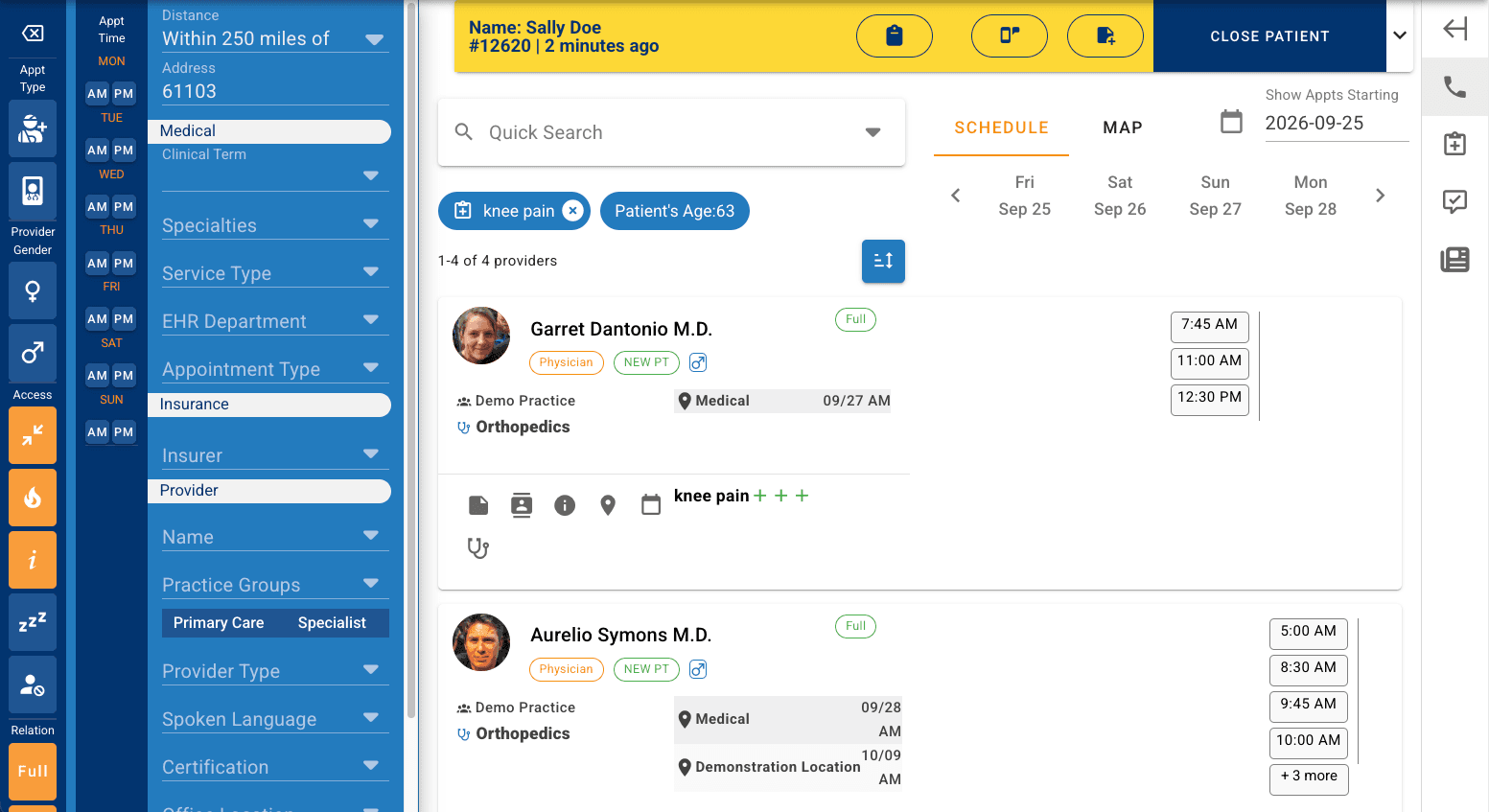
Advisor scheduling workspace showing a patient banner, search filters for specialties, insurance, and provider, and a list of matching providers with open appointment times across upcoming days.
Illustrative Advisor workspace with example filters for schedulers and staff to quickly and accurately schedule across every connected system in a single view.

Patient Self-Service

Let patients book and manage appointments on their terms.

Offer online scheduling under your brand and on your own domain. Guide patients simply to the correct appointment, even when your organization has complex scheduling rules. Help patients manage appointments, and offer open slots through SMS waitlist.

SMS waitlist offer

  1. An earlier opening is available Thu, Mar 12 at 2:15 PM with Dr. Patel at Northside. Reply YES within 20 minutes to take it.
  2. YES
  3. You're confirmed for Thu, Mar 12 at 2:15 PM. Your original appointment has been released.
Illustrative exchange with sample data. Offers go to eligible waitlisted patients for the cancelled slot.
  • Guide Patients to the Correct Appointment

    Patients describe what they need and are led to the correct appointment type and open slots.

  • Let Patients Manage Visits Without Calling

    Schedule, reschedule, cancel, ask a question, or make a request or callback from the same experience.

  • Recover Appropriate Openings with Waitlist Offers

    Cancelled slots are offered to waitlisted patients by SMS and claimed without a phone call.

Capabilities in detail

|
Find and book an appointmentSimplify your organization's most complex scheduling rules and provider protocols into an easy workflow that guides patients to an appointment that fits.
  • Your organization's configured scheduling rules

    Online booking follows the scheduling rules configured for your organization, presented in a patient-friendly format that leads patients to the right appointment.

  • Condition-based appointment-type guidance

    Our patient-friendly medical taxonomy, covering hundreds of subspecialties, allows patients to describe what they need and be guided to the appropriate appointment and providers who can see them.

  • Visit requirements

    Optionally, any requirements or special alerts for the patient's visit, such as preparation instructions, can be presented during the patient booking workflow.

  • Preference matching

    Patients are matched to open slots based upon their preferences and your customizations and rules, including location limitations, provider preferences, and timing.

  • Eligibility verification

    Insurance eligibility can be verified at the time of booking where your connected systems support it, so coverage questions surface before the visit rather than at check-in.

Manage appointments and get helpPatients are empowered to manage all scheduling themselves, on their schedule, and prompted to reach out to your staff when necessary.
  • Rescheduling, cancellation, and inquiries

    Patients can change, reschedule, or cancel appointments and submit inquiries through the self-service experience without calling.

  • Callback requests

    If a patient runs into a problem during self-service, they can request a callback from your staff instead of abandoning the process.

Fill openings and send remindersKeep the schedule full and patients informed.
  • SMS waitlist offers

    An automated waitlist fills cancellations by SMS text message. Patients receive an offer for the open slot and can claim it without a voice call.

  • Reminder delivery

    Appointment reminders can be delivered through MDfit, your native EMR/EHR system, or both, configured to match your existing workflows.

Branding and integrationYour domain, your brand, connected to your systems. Your patients are never confused as to what site they're booking.
  • White-label branding on your own domain

    Fully white-labeled to your marketing standards and delivered on your own domain. Patients see your brand, which avoids confusion and builds trust.

  • Integration scope

    Patient Self-Service connects to your EMR/EHR through MDfit's integration layer. Eligibility verification and reminder delivery depend on the capabilities of your connected systems.

  • Standalone Solution

    Patient Self-Service can be implemented on its own, or in conjunction with any other MDfit solutions.

Confirm Bookings and Keep Connected Schedules Aligned

Your customized scheduling rules and specific provider information are configured for your organization during our implementation, and then ongoing throughout the duration of the service as your organization grows and evolves. Technical integrations connect your EMR/EHR, eligibility verification, and other 3rd party systems through MDfit's integration layer.

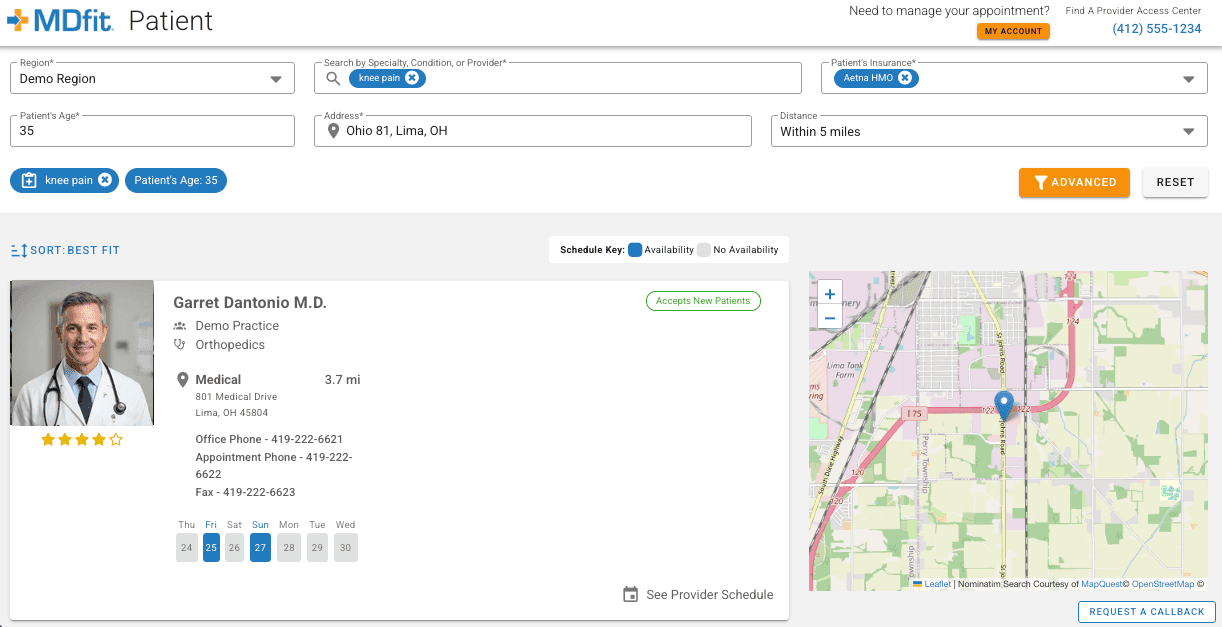
MDfit patient booking screen: a search for knee pain within five miles returns an orthopedics provider accepting new patients, with available dates highlighted and a map of nearby locations.
Illustrative patient self-service booking experience. Patients have multiple search options to quickly find the correct provider accepting patients, and their real-time availability; then book directly into your EMR/EHR.

Voice AI Automation

Automate routine calls. Knows when to bring in your staff.

Free up your staff's time by allowing the MDfit voice AI to help patients schedule appointments and complete routine requests by phone, 24/7. Conversational AI follows your configured workflows, rules, and requirements and connects callers with staff when human assistance is needed and available.

  • Automate Supported Patient Requests

    Answer scheduling calls, appointment confirmations, new bookings, reschedules, cancellations, and supported requests (such as eligibility questions or medication renewals) at any hour, in multiple languages.

  • Apply Scheduling and Transfer Rules

    Book within your rules and visit requirements, including multi-step appointments.

  • Give Staff the Context for Human Handoff

    Recognizes signs of caller frustration and automatically transfers to available staff with conversation context and full transcripts.

Capabilities in detail

|
Scheduling and supported requestsWhat callers can complete without waiting for a person.
  • New-patient intake

    Friendly virtual agents collect all the new patient information needed to accurately schedule new patients according to your specific scheduling rules and requirements. The patient is authenticated and their new patient appointment confirmed in real time.

  • Rules-based and multi-step booking

    Appointments are booked following your organization's scheduling rules and visit requirements, including supported complex multi-step booking.

  • Supported routine requests

    Beyond new bookings, callers can complete routine tasks such as cancellations, appointment confirmations, medication renewal requests, and general inquiries. The set of supported requests is configured for your organization and can vary based upon your business hours, so that certain skills are only available when human escalation is also available.

  • Reminders and scheduling updates

    Patients can be prompted to opt in for SMS confirmations and appointment reminders, reducing your no-shows and allowing patients to join waitlists. Every update to the schedule is in real time, so your staff always see the current state.

Conversation and human handoff“Helpful” natural conversation, without awkward delays, and a clear path to your staff when it matters.
  • Natural, low-latency speech

    Unlike early-generation robotic phone systems with long pauses and rigid scripts, the conversational AI responds quickly and adapts tone and terminology to match your brand and patient expectations.

  • Multiple languages

    Conversations are available in multiple languages so more patients can complete scheduling by phone without waiting for a bilingual staff member. Current supported languages include English, Spanish, and French.

  • Human help when frustration rises

    Empathetic, the voice AI recognizes signs of caller frustration and automatically transfers to available staff with conversation context and full transcripts. When enabled, callers do not need to say ‘representative’ or ‘human’ or request a transfer (although they still can).

  • Contextual handoff within your rules

    Workflows and transfer rules are configured for your organization both during implementation and then ongoing, as your organization evolves. When a caller is transferred during your normal working hours, available staff receive the conversation so far and the transcript, so patients do not repeat themselves.

  • Works with your phone system

    MDfit has integrated with many common phone systems, so calls can be answered and transferred within the telephony you already operate.

Security and oversightBuilt for healthcare data, with records you can review.
  • HIPAA-compliant and encrypted

    Built for healthcare with HIPAA compliance, robust patient authentication, encrypted communications, and audit trails you can trust with sensitive patient data.

  • Conversation transcripts

    Complete transcripts are stored for compliance audit and quality review. Searchable records support training, dispute resolution, and regulatory requirements.

Time Savings for your staffWhat drives results, and how to estimate yours.
  • What the results depend on

    Time savings depend on your call mix, the hours of coverage you automate, and how much of your scheduling you'd like to be completed by MDfit's voice AI, all within your configured rules. Calls that fall outside supported workflows still route to staff.

  • Estimating your impact

    The ROI calculator models call volume, staff hours/costs, and appointment information to allow you to quickly estimate an impact to your bottom line. Please reach out to start a conversation if you'd like an in-depth ROI analysis that considers dozens of additional factors we've worked on with customers like you.

Configuration and integration

Workflows, scheduling rules, supported requests, and transfer rules are configured for your organization during implementation, and then continuously during the duration of your MDfit service. Voice AI Automation connects to your EMR/EHR through MDfit's integration layer and has been integrated with many common phone systems. Voice AI Automation can be implemented on its own or alongside any other MDfit solution.

Included Integration, Security and Operational Results

A typical organization sees 40% to 50% immediate time savings. For many organizations, automating both routine calls and optimizing online scheduling has reduced scheduling staffing costs by up to 80% compared with traditional staffed schedulers, measured against the cost of handling the same call volume with live agents. Results depend on call mix, hours of coverage, and how much of your scheduling can be completed within configured rules.

Next Steps

Evaluate Deployment Fit and Results

Each solution can be deployed on its own or combined. Use these resources to size the opportunity, confirm integration support, and compare the model with results from live deployments.

  • Model the economics

    Estimate scheduling automation savings from your appointment volume, staff costs and workflow assumptions.

    Open the ROI calculator
  • Confirm integration fit

    Review the Epic reference architecture and the interfaces MDfit supports for availability, write-back and referrals.

    Review reference architectures
  • Compare with measured deployments

    Talk through deployment scope with the team and request references from organizations with a similar access model.

    Contact the team
MDfit - Healthcare Scheduling Platform

The intelligent scheduling platform trusted by healthcare organizations for over a decade. 29M+ appointments scheduled across health systems, medical groups, and FQHCs.

Founded 2013 in Pittsburgh, Pennsylvania

Solutions

  • Contact Centers
  • Patient Self-Service
  • Voice AI Automation
  • Directory Management
  • Marketing with AdFit

Platform

  • Access Platform
  • Patient Journey
  • Analytics & Reporting
  • Implementation & Support
  • Reference Architectures
  • FAQ

Company

  • About
  • Contact
  • Partnerships
  • Blog
  • Support

Customers

Socials

PrivacyTerms

© 2013-2026 Axixe LLC. All Rights Reserved.