Patient Self-Service Scheduling
Online booking under your brand that guides patients to the correct appointment, respects your scheduling rules, and keeps schedules full.
Patient Self-Service
Let patients book and manage appointments on their terms.
Offer online scheduling under your brand and on your own domain. Guide patients simply to the correct appointment, even when your organization has complex scheduling rules. Help patients manage appointments, and offer open slots through SMS waitlist.
SMS waitlist offer
- An earlier opening is available Thu, Mar 12 at 2:15 PM with Dr. Patel at Northside. Reply YES within 20 minutes to take it.
- YES
- You're confirmed for Thu, Mar 12 at 2:15 PM. Your original appointment has been released.
Guide the right booking
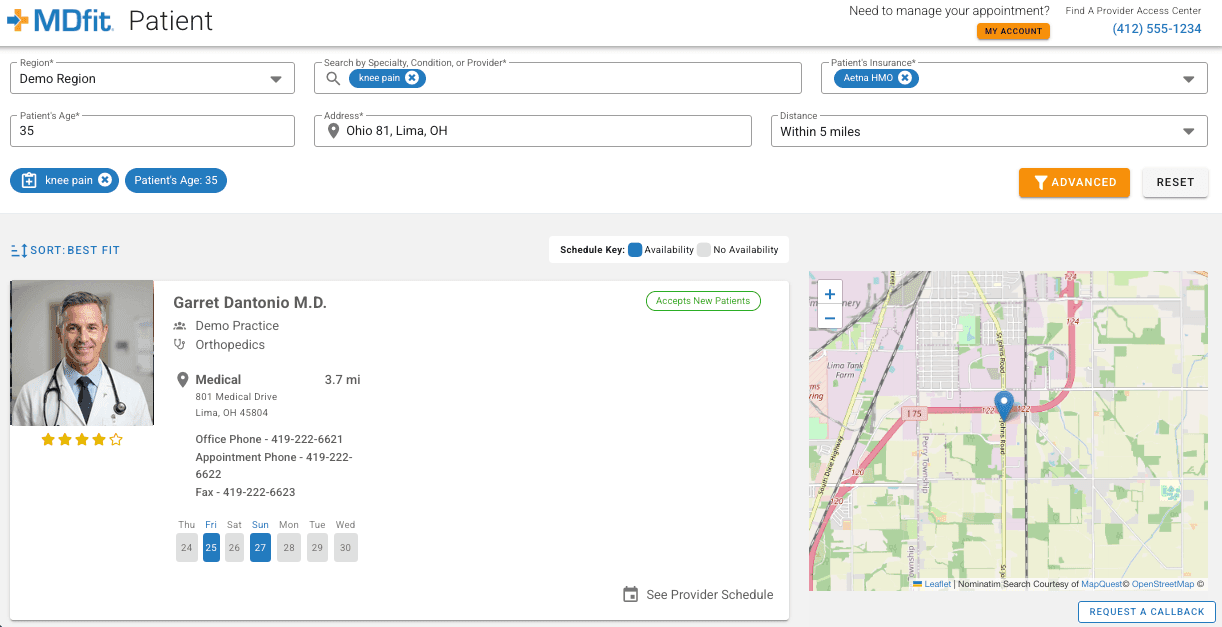
Patients describe what they need and are led to the correct appointment type and open slots.
Manage appointments without calling
Schedule, reschedule, cancel, ask a question, or make a request or callback from the same experience.
Offer waitlist options by text
Cancelled slots are offered to waitlisted patients by SMS and claimed without a phone call.
Capabilities in detail
Find and book an appointmentSimplify your organization's most complex scheduling rules and provider protocols into an easy workflow that guides patients to an appointment that fits.
Your organization's configured scheduling rules
Online booking follows the scheduling rules configured for your organization, presented in a patient-friendly format that leads patients to the right appointment.
Condition-based appointment-type guidance
Our patient-friendly medical taxonomy, covering hundreds of subspecialties, allows patients to describe what they need and be guided to the appropriate appointment and providers who can see them.
Visit requirements
Optionally, any requirements or special alerts for the patient's visit, such as preparation instructions, can be presented during the patient booking workflow.
Preference matching
Patients are matched to open slots based upon their preferences and your customizations and rules, including location limitations, provider preferences, and timing.
Eligibility verification
Insurance eligibility can be verified at the time of booking where your connected systems support it, so coverage questions surface before the visit rather than at check-in.
Manage appointments and get helpPatients are empowered to manage all scheduling themselves, on their schedule, and prompted to reach out to your staff when necessary.
Rescheduling, cancellation, and inquiries
Patients can change, reschedule, or cancel appointments and submit inquiries through the self-service experience without calling.
Callback requests
If a patient runs into a problem during self-service, they can request a callback from your staff instead of abandoning the process.
Fill openings and send remindersKeep the schedule full and patients informed.
SMS waitlist offers
An automated waitlist fills cancellations by SMS text message. Patients receive an offer for the open slot and can claim it without a voice call.
Reminder delivery
Appointment reminders can be delivered through MDfit, your native EMR/EHR system, or both, configured to match your existing workflows.
Branding and integrationYour domain, your brand, connected to your systems. Your patients are never confused as to what site they're booking.
White-label branding on your own domain
Fully white-labeled to your marketing standards and delivered on your own domain. Patients see your brand, which avoids confusion and builds trust.
Integration scope
Patient Self-Service connects to your EMR/EHR through MDfit's integration layer. Eligibility verification and reminder delivery depend on the capabilities of your connected systems.
Standalone Solution
Patient Self-Service can be implemented on its own, or in conjunction with any other MDfit solutions.
Configuration and integration
Your customized scheduling rules and specific provider information are configured for your organization during our implementation, and then ongoing throughout the duration of the service as your organization grows and evolves. Technical integrations connect your EMR/EHR, eligibility verification, and other 3rd party systems through MDfit's integration layer.
Other MDfit solutions
- Contact CentersCoordinate complex scheduling from one workspace with MDfit Advisor.
- Voice AI AutomationAutomate routine calls and bring in your staff when it matters.
- Marketing with AdFitTurn marketing spend into booked appointments with AdFit.
- Directory ManagementOne validated source of provider information behind every scheduling path.